
Online-Dating hängt stark von Profilfotos ab. Ein einzelnes Bild prägt oft den ersten Eindruck. Aus diesem Grund verwenden Betrüger und gefälschte Profile häufig Fotos, die von sozialen Medien, Modelportfolios oder Stockfoto-Websites entnommen wurden.
Hier wird die Rückwärtssuche von Bildern für Dating-Apps nützlich. Sie ermöglicht es Benutzern, ein Profilfoto hochzuladen und herauszufinden, wo dasselbe Bild anderswo im Internet erscheint. Berichte über das Wachstum der Online-Dating-Branche zeigen, dass Millionen von Menschen weltweit Dating-Apps nutzen.
Für Menschen, die Dating-Plattformen in den Vereinigten Staaten nutzen, kann das Verständnis, wie die Rückwärtssuche von Bildern funktioniert, helfen, Identitäten zu verifizieren, Catfishing zu vermeiden und sicherere Online-Interaktionen aufzubauen. Viele Menschen verwenden auch Tools, die entwickelt wurden, um versteckte Dating-Profile zu erkennen, wenn sie bestätigen möchten, ob jemand auf Dating-Plattformen aktiv ist.
Dieser Leitfaden erklärt, wie die Rückwärtssuche von Bildern funktioniert, warum sie in Dating-Apps wichtig ist und wie Sie sie Schritt für Schritt nutzen können.
Was die Rückwärtssuche von Bildern in Dating-Apps bedeutet
Bevor Sie die Schritte lernen, ist es hilfreich zu verstehen, was der Zweck einer Rückwärtssuche von Bildern ist.
Definition
Die Rückwärtssuche von Bildern ist eine Technologie, die ein Bild analysiert und übereinstimmende oder visuell ähnliche Bilder im Internet findet. Zu lernen, wie man herausfindet, ob jemand auf Dating-Apps ist, beginnt oft mit der Verifizierung von Profilfotos und Online-Aktivitätsmustern.
Anstatt mit Wörtern zu suchen, suchen Benutzer mit dem Bild selbst. Berichte über das Wachstum der Online-Dating-Branche zeigen, dass Millionen von Menschen weltweit Dating-Apps nutzen.
Was ist der Zweck einer Rückwärtssuche von Bildern?
Der Hauptzweck ist die Verifizierung.
Menschen verwenden häufig die Rückwärtssuche von Bildern, um:
- Profilfotos von Dating-Apps zu verifizieren
- Gestohlene oder wiederverwendete Bilder zu identifizieren
- Gefälschte Online-Identitäten zu erkennen
- Die ursprüngliche Quelle eines Bildes zu entdecken
Wenn sie für Online-Dating verwendet wird, hilft die Rückwärtssuche von Bildern für Dating-Apps festzustellen, ob jemand seine echten Fotos oder die Fotos einer anderen Person verwendet.
Wie funktioniert die Rückwärtssuche von Bildern?
Viele Ermittlungen darüber, wie man einen Betrüger online erwischt, beginnen damit, zu überprüfen, ob Profilbilder anderswo im Internet erscheinen.
Der Prozess umfasst Computer Vision und Bildverarbeitungsalgorithmen.
Grundprozess
- Das System scannt das hochgeladene Bild.
- Es analysiert Muster wie Formen, Farben und Gesichtsstrukturen.
- Der Algorithmus vergleicht diese Muster mit indizierten Bildern im Internet.
- Übereinstimmende oder ähnliche Bilder erscheinen in den Suchergebnissen.
Was das System erkennt
Rückwärtssuche-Tools vergleichen:
| Merkmal | Was es erkennt |
| Gesichtszüge | Ähnliche Gesichter in verschiedenen Fotos |
| Bildmetadaten | Auflösung, Kameradaten |
| Hintergrundobjekte | Standorte und Wahrzeichen |
| Visuelle Muster | Formen, Texturen und Farbkombinationen |
Dank dieser Technologie kann die Rückwärtssuche von Bildern für Dating-Apps doppelte Bilder identifizieren, selbst wenn sie leicht zugeschnitten oder bearbeitet sind.
Wie macht man eine Google-Rückwärtssuche von Bildern?
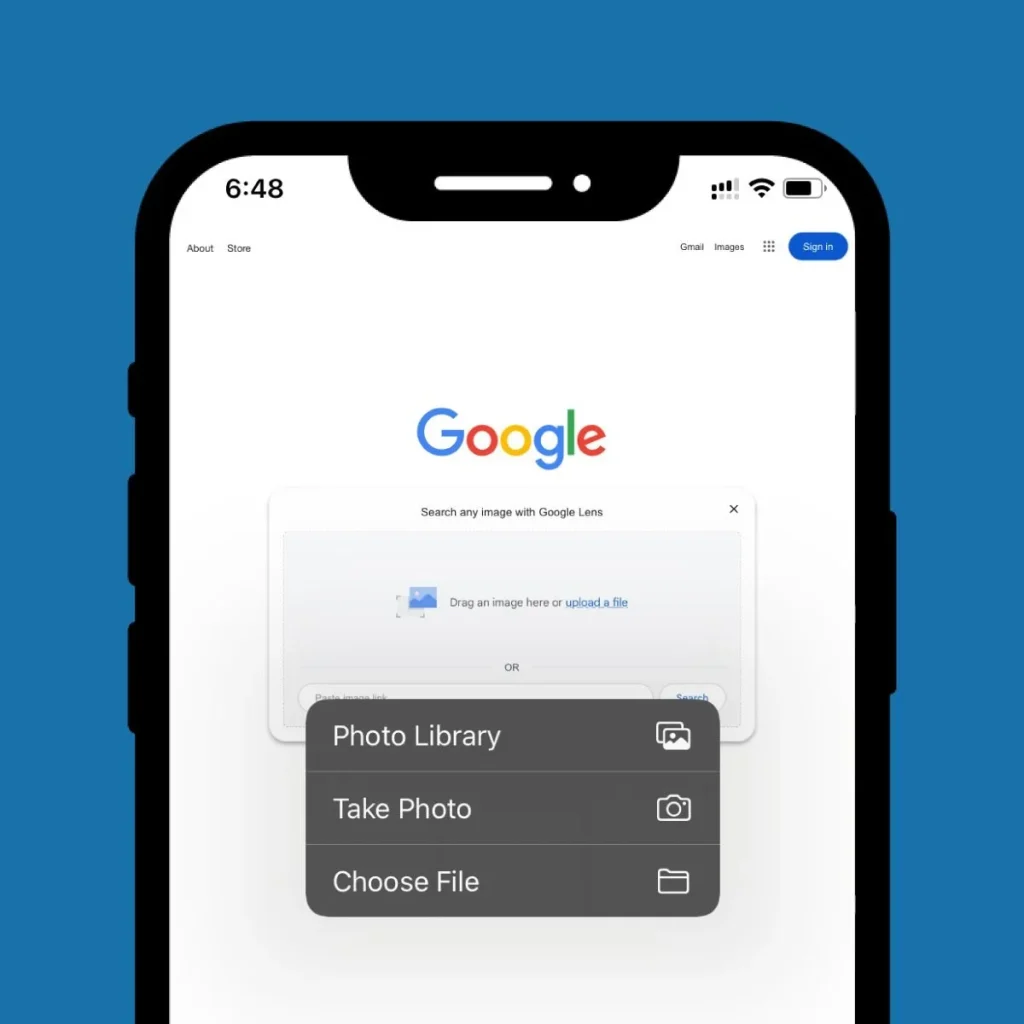
Eine der häufigsten Methoden zur Verifizierung eines Dating-Fotos ist die Durchführung einer Google-Rückwärtssuche von Bildern. Wenn Sie Profile von Ihrem Telefon aus überprüfen, empfehlen Anleitungen, die erklären, wie man einen Betrüger auf dem iPhone erwischt, häufig, Profilbilder mit einer Rückwärtssuche zu verifizieren.
Schritt-für-Schritt-Prozess
- Speichern Sie das Profilfoto aus der Dating-App.
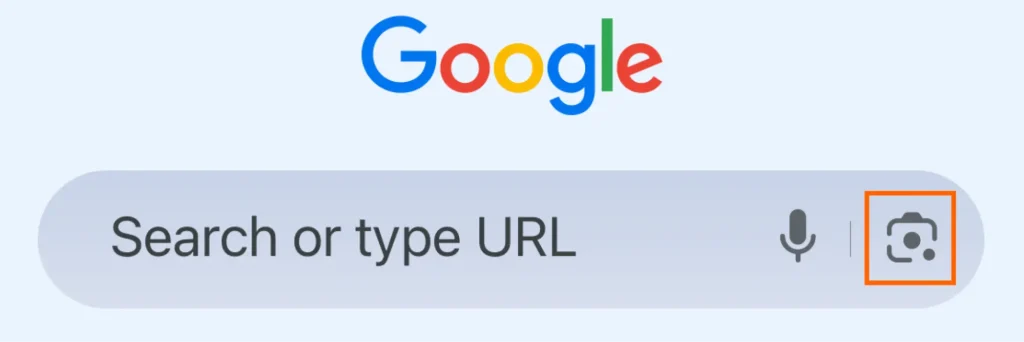
- Öffnen Sie Google Bilder in Ihrem Browser.
- Klicken Sie auf das Kamerasymbol in der Suchleiste.
- Laden Sie das gespeicherte Bild hoch.
- Überprüfen Sie die Ergebnisse, die ähnliche Bilder anzeigen.
Diese Methode hilft festzustellen, ob das Bild einer anderen Person gehört oder auf nicht verwandten Websites erscheint.
Die Verwendung der Rückwärtssuche von Bildern für Dating-Apps über Google ist oft der schnellste Weg, um Profilfotos zu verifizieren.
Wie führt man eine Rückwärtssuche von Bildern aus der Galerie durch?
Wenn Sie bereits einen Screenshot eines Dating-Profils haben, können Sie eine Rückwärtssuche von Bildern aus der Galerie durchführen.
Einfache Methode
- Machen Sie einen Screenshot des Profilfotos.
- Speichern Sie das Bild in Ihrer Telefon-Galerie.
- Laden Sie das Bild in ein Rückwärtssuche-Tool hoch.
- Überprüfen Sie die übereinstimmenden Ergebnisse.
Diese Methode funktioniert gut, wenn eine Dating-App direkte Bilddownloads verhindert.
Viele Menschen verwenden diese Technik, wenn sie eine Rückwärtssuche von Bildern für Dating-Apps auf mobilen Geräten durchführen.
Wie macht man eine Rückwärtssuche von Bildern auf Pinterest?
Einige Menschen verwenden auch visuelle Entdeckungsplattformen. Zu lernen, wie man eine Rückwärtssuche von Bildern auf Pinterest durchführt, kann manchmal aufdecken, wo ein Bild ursprünglich herkommt. Ähnliche Techniken zur visuellen Suche werden häufig in Ermittlungen darüber verwendet, wie man einen Betrüger erwischt, der alles löscht, wo digitale Spuren begrenzt sind.
Schritte
- Öffnen Sie Pinterest.
- Laden Sie das Bild mit dem visuellen Suchtool hoch.
- Pinterest scannt ähnliche Bilder auf der Plattform.
Obwohl Pinterest sich auf visuelle Inspiration konzentriert, kann seine Suchtechnologie dennoch doppelte Fotos aufdecken.
Dies kann gelegentlich helfen, wenn man eine Rückwärtssuche von Bildern für Dating-Apps durchführt, insbesondere wenn das Bild aus Lifestyle- oder Fotografie-Inhalten stammt.
Kann ChatGPT Rückwärtssuchen von Bildern durchführen?
Eine Frage, die manchmal in den Suchergebnissen auftaucht, ist, ob ChatGPT Rückwärtssuchen von Bildern durchführen kann.
Die kurze Antwort ist nein.
Wichtige Klarstellung
ChatGPT funktioniert nicht als Rückwärtssuchmaschine für Bilder.
Es kann erklären:
- wie die Rückwärtssuche von Bildern funktioniert
- wie man Dating-Fotos verifiziert
- welche Tools zu verwenden sind
Es kann jedoch das Internet nicht nach Bildübereinstimmungen durchsuchen.
Wenn Sie Fotos verifizieren möchten, während Sie die Rückwärtssuche von Bildern für Dating-Apps verwenden, benötigen Sie weiterhin spezielle Bildsuchtools.
Anzeichen dafür, dass ein Dating-Profilfoto gefälscht sein könnte
Die Rückwärtssuche von Bildern funktioniert am besten in Kombination mit Beobachtungen. Das Verständnis von Verhaltensmustern wie häufigen Anzeichen für betrügende Frauen kann helfen, zusätzlichen Kontext bei der Verifizierung verdächtiger Online-Profile zu bieten.
Hier sind häufige Warnzeichen.
Visuelle Indikatoren
- Professionelle Modelqualität Fotos
- Perfekte Studio-Beleuchtung
- Bilder, die wie Stockfotografie aussehen
- Nur ein Foto im Profil
Verhaltensindikatoren
- Vermeidet Videoanrufe
- Bewegt Gespräche schnell zu Messaging-Apps
- Fordert Geld oder finanzielle Hilfe an
Wenn diese Signale zusammen mit verdächtigen Ergebnissen aus der Rückwärtssuche von Bildern für Dating-Apps auftreten, könnte das Profil betrügerisch sein.
Ein einfaches Framework zur Verifizierung von Dating-Profilen
Um beim Online-Dating sicher zu bleiben, können Sie ein einfaches Verifizierungssystem befolgen. Die Bildverifizierung ist nur ein Schritt. Verhaltensindikatoren wie häufige Anzeichen für betrügende Frauen können ebenfalls Inkonsistenzen in der Geschichte einer Person aufdecken.
Schritt 1: Bildverifizierung
Führen Sie das Profilfoto durch die Rückwärtssuche von Bildern für Dating-Apps.
Schritt 2: Konsistenz des Profils
Überprüfen Sie, ob der Job, der Standort und die Interessen der Person mit ihrer Geschichte übereinstimmen.
Schritt 3: Kommunikationsverhalten
Echte Benutzer:
- stimmen Videoanrufen zu
- teilen normale Alltagsfotos
- halten konsistente Gespräche aufrecht
Diese dreistufige Methode hilft, das Risiko zu verringern, mit gefälschten Konten zu interagieren.
Limitierungen der Rückwärtssuche von Bildern
Obwohl mächtig, ist die Rückwärtssuche von Bildern nicht perfekt. Viele Ermittler verlassen sich jetzt auf moderne Detektivmethoden zur Auffindung von Dating-Profilen, die Bildsuchen mit der Analyse digitaler Fußabdrücke kombinieren.
Situationen, in denen es möglicherweise nicht funktioniert
Erklärung
Aufgrund dieser Einschränkungen sollte die Rückwärtssuche von Bildern für Dating-Apps immer mit normalen Gesprächen und Urteilen kombiniert werden.
Ethik- und Datenschutzüberlegungen
Die Rückwärtssuche von Bildern sollte immer verantwortungsbewusst eingesetzt werden. Es ist auch wichtig, die rechtlichen Risiken der Überprüfung des Telefons eines Ehepartners zu verstehen, bevor man versucht, private Informationen von jemandem zu verifizieren.
Prinzipien des verantwortungsvollen Gebrauchs
- Verifizieren Sie die Authentizität, ohne die Privatsphäre zu verletzen
- Vermeiden Sie es, jemanden ohne Beweise öffentlich zu beschuldigen
- Verwenden Sie die Informationen nur für die persönliche Sicherheit
Das Ziel der Rückwärtssuche von Bildern für Dating-Apps ist Schutz, nicht Überwachung.
Verwandte Lektüre
- Wie man erkennt, ob jemand eine geheime Messaging-App verwendet
- Was bedeutet kürzlich aktiv auf Tinder? Eine klare Erklärung für Benutzer